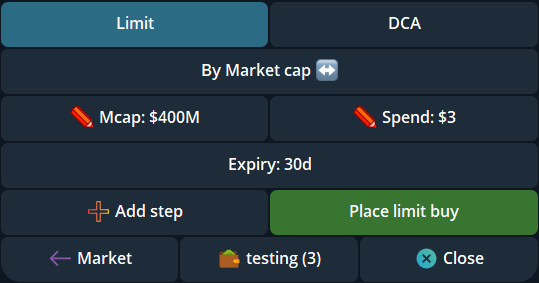
- The /limit reply flow accepts a complete order instruction and presets.
- Auto trailing stop can be configured for future eligible buys in separate Market and Limit/DCA Auto TP/SL groups.
- A dollar-amount sell across selected wallets allocates the request in proportion to each wallet's position value.
- Ordinary new wallets now start with Auto-bridge on; the per-wallet setting remains adjustable.
Quicker order entry and automatic trailing stops
A complete /limit reply to a live token panel can place a limit order using the values in the command; the panel also offers presets. Check the token, side, wallet, target and amount before sending a complete command, because sending it is the placement action. Use /limit alone to see the tutorial first.
Auto trailing stop joined Auto TP/SL controls for future eligible buys. Its settings are grouped separately for Market buys and Limit/DCA fills, so review the intended group and the resulting /orders entries after a buy. An enabled setting does not rewrite orders already placed.
Dollar sells across selected wallets
When you request a dollar-amount sell across selected Telegram wallets, Cove now distributes the request in proportion to each wallet's position value. The same fraction of each wallet's holding is targeted, subject to live balances and rounding. This differs from repeating the full dollar amount on every wallet.
Review the preview and each wallet's result. The amount actually received still depends on the live route, price movement and fees. The sell panel also labels which wallet its controls will act on when a larger bag spans several wallets.
The /transfer flow can choose an eligible source wallet in another real profile without switching the active profile. A token transfer now warns when armed sell orders remain on the source wallet; moving the holding does not move or cancel those orders. Verify the source and review existing orders before confirming.
A trade estimate before an agent places an order
An authorized Cove agent can request an estimate for a buy or sell without placing an order. Wallet-based estimates check available funds, while a hypothetical size estimate can model a trade without a funded wallet. This gives an agent a read-only check before it asks to act.
An estimate can expire and does not reserve a quote or guarantee a fill. A later trading action still needs its own current checks and applicable approval.
Check the bridge setting on a new wallet
Ordinary newly generated or individually imported wallets now start with Auto-bridge enabled. Eligible other-chain stablecoin deposits can therefore begin moving toward the trading balance without a separate bridge approval. The setting belongs to each wallet and can be turned off in /wallets. Admin bulk-imported wallets remain a separate exception, so always check the displayed wallet state before a deposit.
Explore the features
- Cove Docs: limit orders
- Cove Docs: trailing stops
- Cove Docs: bridge settings
- Cove Docs: multi-wallet trading
Product settings and availability can change. Check the current documentation before using a feature. Educational content does not predict trading outcomes.
How we approach our content